
Using Functions
Motivation
How to reuse code so we can write less?
Writing a loop is a simple way of code reuse because a piece of code is executed multiple times, once for each iteration.
Code reuse gives the code an elegant structure that
can be executed efficiently by a computer, and
interpreted easily by a programmer.
How to repeat execution at different times, in different programs, and in slightly different ways?
Functions
How to calculate the logarithm?
There is no arithmetic operator for logarithm.
Do we have to implement it ourselves?
We can use the function log from the math module:
from math import log

log(256, 2)  # log base 2 of 256
8.0
The above computes the base-\(2\) logarithm, \(\log_2(256)\). Like functions in mathematics, a computer function log
is called/invoked with some input arguments
(256, 2)following the function, andreturns an output value computed from the input arguments.
# A function is callable while an integer is not
callable(log), callable(1)
(True, False)
Unlike mathematical functions:
A python function may require no arguments, but we still need to call it with
().
input()
A python function may have side effects and return the value
None.
x = print()
print(x, "of type", type(x))
None of type <class 'NoneType'>
An argument of a function call can be any expression.
print("1st input:", input(), "2nd input", input())
Note that
the argument can also be a function call like function composition in mathematics.
Before a function call is executed, its arguments are evaluated first from left to right.
Why not implement logarithm yourself?
The function from standard library is efficiently implemented and thoroughly tested/documented.
Knowing what a function does is often insufficient for an efficient implementation.
(See how to calculate logarithm as an example.)
Indeed, the math library does not implement log itself:
CPython implementation detail: The
mathmodule consists mostly of thin wrappers around the platform C math library functions. - pydoc last paragraph
(See the source code wrapper for log.)
Exercise What is a function in programming?
A function is a structure that allows a piece of code to be reused in a program.
A function can adapt its computations to different situations using input arguments.
Import Functions from Modules
How to import functions?
We can use the import statement to import multiple functions into the program global frame.
%%mytutor -h 300
from math import ceil, log10

x = 1234
print("Number of digits of x:", ceil(log10(x)))
The above imports both the functions log10 and ceil from math to compute the number \(\lceil \log_{10}(x)\rceil\) of digits of a strictly positive integer \(x\).
How to import all functions from a library?
%%mytutor -h 300
from math import *  # import all except names starting with an underscore

print("{:.2f}, {:.2f}, {:.2f}".format(sin(pi / 6), cos(pi / 3), tan(pi / 4)))
The above uses the wildcard * to import (nearly) all the functions/variables provided in math.
What if different packages define the same function?
%%mytutor -h 300
print("{}".format(pow(-1, 2)))
print("{:.2f}".format(pow(-1, 1 / 2)))
from math import *

print("{}".format(pow(-1, 2)))
print("{:.2f}".format(pow(-1, 1 / 2)))
The function
powimported frommathoverwrites the built-in functionpow.Unlike the built-in function,
powfrommathreturns only floats but not integers or complex numbers.We say that the import statement polluted the namespace of the global frame and caused a name collision.
How to avoid name collisions?
%%mytutor -h 250
import math

print("{:.2f}, {:.2f}".format(math.pow(-1, 2), pow(-1, 1 / 2)))
We can use the full name (fully-qualified name) math.pow prefixed with the module name (and possibly package names containing the module).
Can we shorten a name?
The name of a library can be very long and there can be a hierarchical structure as well.
E.g., to plot a sequence using pyplot module from matplotlib package:
%matplotlib inline
import matplotlib.pyplot

matplotlib.pyplot.stem([4, 3, 2, 1])
matplotlib.pyplot.ylabel(r"$x_n$")
matplotlib.pyplot.xlabel(r"$n$")
matplotlib.pyplot.title("A sequence of numbers")
matplotlib.pyplot.show()
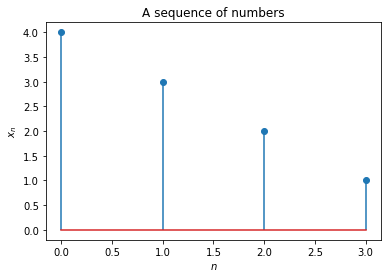
It is common to rename matplotlib.pyplot as plt:
import matplotlib.pyplot as plt

plt.stem([4, 3, 2, 1])
plt.ylabel(r"$x_n$")
plt.xlabel(r"$n$")
plt.title("A sequence of numbers")
plt.show()
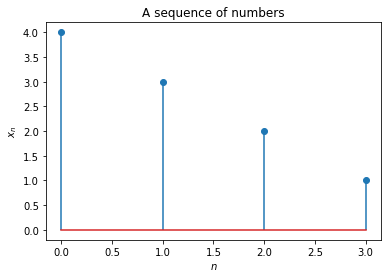
We can also rename a function as we import it to avoid name collision:
from math import pow as fpow

fpow(2, 2), pow(2, 2)
(4.0, 4)
Exercise What is wrong with the following code?
import math as m

for m in range(5):
    m.pow(m, 2)
---------------------------------------------------------------------------
AttributeError                            Traceback (most recent call last)
<ipython-input-14-da21088bfe7d> in <module>
      2
      3 for m in range(5):
----> 4     m.pow(m, 2)

AttributeError: 'int' object has no attribute 'pow'
There is a name collision: m is assigned to an integer in the for loop and so it is no longer the module math when calling m.pow.
Exercise Use the randint function from random to simulate the rolling of a die, by printing a random integer from 1 to 6.
import random

print(random.randint(1, 6))
2
Built-in Functions
How to learn more about a function such as randint?
There is a built-in function help for showing the docstring (documentation string).
import random

help(random.randint)  # random must be imported before
Help on method randint in module random:

randint(a, b) method of random.Random instance
    Return random integer in range [a, b], including both end points.
help(random) # can also show the docstring of a module
help(help)
Does built-in functions belong to a module?
Indeed, every function must come from a module.
__builtin__.print("I am from the __builtin__ module.")
I am from the __builtin__ module.
__builtin__ module is automatically loaded because it provides functions that are commonly use for all programs.
How to list everything in a module?
We can use the built-in function dir (directory).
dir(__builtin__)
We can also call dir without arguments.
What does it print?
dir()