
Turtle Graphics (optional)
In this notebok, we will demonstrate the benefit of code reuse with turtle, which is a module for drawing graphics.
Start to move the turtle
Because Jupyter notebook does not fully support turtle (the Tkinter GUI toolkit), we will use Thonny under the Linux Desktop instead.
How to start a python script in Thonny?
Open a
Desktopfrom the Launcher.Open
ThonnyviaApplication->Development->Thonnyfrom the menu at the top left corner.Create a new Python script via
File->New.Save the file using
File->Save as...tocs1302/Lab3b/myscript.pyunder your home directory.
Note
You may also use Xpra on Windows/Mac/Linux, in which case you can run Thonny from the menu item
Start->Applications->Thonny. For mobile devices or devices with limited memory,Desktopis recommended.A python script ends with the extension
.py.myscript.pyshould be placed in the same folder as your Lab3b for the later code to work.
How to move the turtle?
Type the following in your python script to import a turle and instruct it to move forward 100 steps:
import turtle as t

t.forward(100)
t.exitonclick()
To get the turtle moving, press F5 or click the green play button in the toolbar:
To exit, simply click on the display window.
Draw polygons
How to have the turtle draw a triangle?
The following code draws a red equilateral triangle:
t.fillcolor('red')
t.begin_fill()

t.forward(100)
t.left(120)
t.forward(100)
t.left(120)
t.forward(100)
t.left(120)

t.end_fill()
t.exitonclick()
t.left(120) rotates the turtle to the left by 120 degrees.
Exercise (Optional) The code above is quite repetitive. Shorten the code using a for loop and run it using your python script.
How to draw a square, a regular pentagon, or even any regular polygon?
Instead of writing a new script for each polygon, we can write a function:
def polygon(n, edge, color):
    """Draw a colored polygon.

    A function using turtle to draw a polygon
    with arbitrary color and number of edges.

    Parameters
    ----------
    n: int
        number of edges.
    edge: int
        length of each edge.
    color: string
        color of the polygon
    """
    ...
Exercise (Optional) Complete the function polygon and call it to draw a 'blue' pentagon with length 50.
Hint
For a \(n\)-sided polygon, the turtle should turn by an angle of \(\frac{360}{n}\) at each corner of the polygon. E.g., for the equilateral triangle with n=3, the turning angle should be \(\frac{360}3=120\).
Tesselation
Tessellation problem
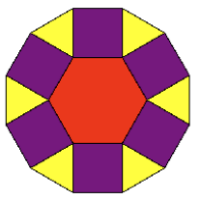
Tessellation refers to the problem of using geometric shapes to tile a flat plane. E.g., rhombitrihexagonal tiling is a beautiful tessellation often used by temples and museums. Each hexagon is surrounded by 6 triangles and 6 squares.

The following code draws:
from polygons import *

t.speed('fast')
edge = 50

t.left(180)
hexagon(edge, 'red')
t.right(180)

for _ in range(6):
    t.left(30)
    triangle(edge, 'yellow')
    t.right(90)
    square(edge, 'purple')
    t.forward(edge)

t.hideturtle()
t.exitonclick()
Tip
The module
polygonsimplements the functionstriangle,square,hexagon, as well as the more general functionpolygon.t.speed('fast')speeds up the turle. You can also use'fastest'.t.hideturtle()hides the turtle.
Exercise Modify the above code to draw the following pattern:
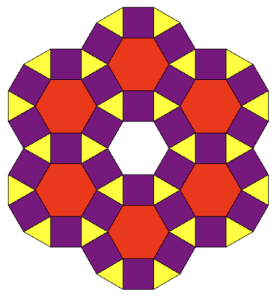
Challenge yourself making the code as efficient as possible, e.g., by avoiding double drawing.