
Improved Quadratic Equation Solver
In this notebook, we will improve the quadratic equation solver in the previous lab using conditional executions.
First of all, run the following to setup the environment.
from ipywidgets import interact
import math
import numpy as np
Discriminant
Recall that a quadratic equation is
where \(a\), \(b\), and \(c\) are real-valued coefficients, and \(x\) is the unknown variable.
Definition 2 (Discriminant)
The disciminant of a quadratic equation is defined as
The discriminant \(\Delta\) discriminates the roots \(\frac{-b\pm \sqrt{\Delta}}{2a}\) of a quadratic equation:
Proposition 3
The roots of a quadratic equation (3) are the same (repeated) equal to \(-\frac{b}{2a}\) when the discriminant is zero, i.e., \(\Delta=0\).
Exercise Complete the following function by assigning roots only one root when the discriminant is zero. E.g., if \((a,b,c)=(1,-2,1)\), then roots should be assigned the value 1.0 instead of 1.0, 1.0.
def get_roots(a, b, c):
    d = b ** 2 - 4 * a * c  # discriminant
    if math.isclose(d, 0):
        # YOUR CODE HERE
        raise NotImplementedError()
    return roots
Hint
Consider using the if statement as follows:
def get_roots(a, b, c):
    d = b ** 2 - 4 * a * c  # discriminant
    if math.isclose(d, 0):
        roots = ___  # repeated root
    else:
        d **= 0.5
        roots = ___, ___
    return roots
This is a solution template where ___ needs to be filled in with appropriate code. If you have a more efficient/simpler implementation, you need not follow the solution template. E.g., to challenge your understanding of short-circuit evaluation, you can write your solution using boolean operations without any if statement.
# tests
def test_get_roots(roots, a, b, c):
    def mysort(c):
        return c.real, c.imag

    roots_ = get_roots(a, b, c)
    assert (
        hasattr(roots, "__len__")
        and np.isclose(
            sorted(list(roots), key=mysort), sorted(list(roots_), key=mysort)
        ).all()
        or roots == roots_ or np.isclose(roots, roots_)
    )


test_get_roots((-1.0, 0.0), 1, 1, 0)
test_get_roots(0.0, 1, 0, 0)
Exercise Why use math.isclose(d, 0) instead of d == 0?
YOUR ANSWER HERE
Linear equation
If \(a=0\), the earlier formula for the roots are invalid due to division by zero. Nevertheless, the equation remains valid:
Exercise Improve the function get_roots to return the root \(-\frac{c}{b}\) when \(a=0\).
def get_roots(a, b, c):
    d = b ** 2 - 4 * a * c
    # YOUR CODE HERE
    raise NotImplementedError()
    return roots
Hint
Solution template:
def get_roots(a, b, c):
    d = b ** 2 - 4 * a * c    # discriminant
    if ___:
        roots = ___
    elif math.isclose(d, 0):
        roots = ___  # repeated root
    else:
        d **= 0.5
        roots = ___
    return roots
# tests
test_get_roots((-1.0, -0.0), 1, 1, 0)
test_get_roots(0.0, 1, 0, 0)
test_get_roots(0.5, 0, -2, 1)
Degenerate cases
What if \(a=b=0\)? In that case, the equation becomes
which is always satisfied if \(c=0\) but never satisfied if \(c\neq 0\).
Exercise Improve the function get_roots to return root(s) under all cases:
If \(a=0\) and \(b\neq 0\), assign
rootsto the single root \(-\frac{c}{b}\).If \(a=b=0\) and \(c\neq 0\), assign
rootstoNone.
Note thatNoneis an object, not a string.If \(a=b=c=0\), there are infinitely many roots. Assign to
rootsthe tuple-float('inf'), float('inf').
Note thatfloat('inf')converts the string'inf'to a floating point value that represents \(\infty\).
def get_roots(a, b, c):
    d = b ** 2 - 4 * a * c
    # YOUR CODE HERE
    raise NotImplementedError()
    return roots
Hint
Use nested if statements as in the solution template:
def get_roots(a, b, c):
    d = b**2 - 4 * a * c
    if ___:
        if ___:
            if ___:
                roots = -float('inf'), float('inf')
            else:
                roots = None
        else:
            ___
    elif math.isclose(d, 0):
        roots = ___  # repeated root
    else:
        d **= 0.5
        roots = ___
    return roots
# tests
test_get_roots((-1.0, 0.0), 1, 1, 0)
test_get_roots(0.0, 1, 0, 0)
test_get_roots((-float('inf'), float('inf')), 0, 0, 0)
test_get_roots(None, 0, 0, 1)
test_get_roots(0.5, 0, -2, 1)
test_get_roots(1.0, 1, -2, 1)
After you have complete the exercises, you can run your robust solver below:
# quadratic equations solver
@interact(a=(-10,10,1),b=(-10,10,1),c=(-10,10,1))
def quadratic_equation_solver(a=1,b=2,c=1):
    print('Root(s):',get_roots(a,b,c))
Flowcharts (optional)
Let’s play a game to test your understanding of boolean expressions. Run the following program and choose your input so that 1, 2, 3 are each printed in a separate line as follows:
1
2
3
input(1) or input(2) and input(3)
Hint
The following flowchart describes the short-circuit evaluation for the boolean expression as follows:
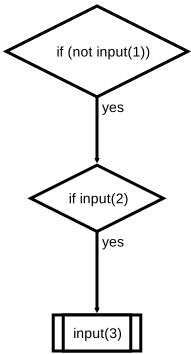
How to read the flowchart?
A flowchart uses arrows to connects a set of annotated blocks. The rules were first specified by ANSI and later adopted in ISO 5807.
For the above game, start from the first decision block at the top and choose the input appropriately to transition along the yes arrows.
Why use a program flowchart?
A program flowchart is a powerful way of describing an algorithm quickly. Unlike a text-based programming language:
The rules governing the program flow can be shown explicitly by arrows.
The annotated graphical blocks can convey the meaning faster using visual clues.
A programmer can draft a program in flowchart without worrying about syntax (indentation, colon, …). E.g., the above flow chart can be implemented as follows using the if statement instead of the boolean operators.
if not input(1):
    if input(2):
        input(3)
How to convert the program to a flowchart automatically?
To draw a flowchart, we can use a vector graphics editor. Inkscape is an open source software the runs in Linux/Mac/Windows. To run on mobile devices, you can run it with the desktop launcher in your jupyter server.
A web application you can run without a desktop is ipydrawio:
In the file tab, create a file called
test.dio.svgand double click it.After you finished drawing the flowchart, save it and use it as an SVG image.
The most convenient way, of course, is to ask python to convert a python code to a flowchart automatically. This can be done with pyflowchart:
from pyflowchart import Flowchart

def code2flow(code):
    '''
    Given input code (as a string), returns the flowchart (as a string) that can be rendered by
    http://flowchart.js.org
    '''
    return Flowchart.from_code(code, simplify=False).flowchart()
Pass the code as a string to code2flow:
fc = code2flow('''
if not input(1):
    if input(2):
        input(3)
''')
print(fc)
cond3=>condition: if (not input(1))
cond8=>condition: if input(2)
sub12=>subroutine: input(3)

cond3(yes)->cond8
cond8(yes)->sub12
The output is a string in a domain-specific language (DSL) that can be rendered here with flowchart.js. Simply overwrite a demo textbox there with the printed flowchart code above.
How to write a documentation with flowcharts?
What about other DSL for special contents such as diagrams, equations, lists, …?
Markdown is becoming popular in writing documentations. jupyter notebooks, jupyterbook, github, … all supports markdown, but to different extents:
Jupyter notebook such as this one supports CommonMark.
Our cs1302 jupyterbook is written in MyST markdown.
Github uses Github Flavored Markdown (GFM).
Unfortunately, none of them support the flowchart code currently.
Nevertheless, many editors such as Typora supports advanced Markdown language with live preview. We can also extend VS Code to do the same using Markdown Preview Enhanced as follows:
Tip
You can install any extension on the VS Code interface of the JupyterHub server. To render flowchart code:
Open
Launcher(click on the + sign in the top left or pressShift + Ctrl + L) and click onVS Codeto create a VSCode tabClick the extension tab on the left and search for Markdown Preview Enhanced.
Click install and refresh the browser.
Click the file explorer tab and create a new file say
test.mdfile.Insert the flowchart in DSL to the
test.mdas follows:```flow cond3=>condition: if (not input(1)) cond8=>condition: if input(2) sub12=>subroutine: input(3) cond3(yes)->cond8 cond8(yes)->sub12 ```
To show the live preview, click the
open previewbutton of Markdown Preview Enhanced located on the tool bar at the top right-hand corner.
You can also using drawio in VS Code using the extension here.
Finally, note that the flow chart does not implement how short-circuit evaluation returns values. E.g., consider entering a for all the inputs and see the difference in the output of the boolean expression and the code that implements the flowchart.
input(1) or input(2) and input(3)
if not input(1):
    if input(2):
        input(3)
Exercise (Optional) Can you implement the boolean expression exactly with the same return value using only conditionals but not boolean operators?
Hint
Consider using conditional expression and assignment expression.