
Calculators
import math
from math import cos, exp, log, pi, sin, tan

import matplotlib.pyplot as plt
import numpy as np
from ipywidgets import interact

# interactive plot with ipympl
%matplotlib widget
The following code is a Python one-liner that creates a calculator.
Evaluate the cell with
Ctrl+Enter.Enter
1+1and see the result.
print(eval(input()))
Tip
Try some calculations below using this calculator:
\(2^3\) by entering
2**3;\(\frac23\) by entering
2/3;\(\left\lceil\frac32\right\rceil\) by entering
3//2;\(3\mod 2\) by entering
3%2;\(\sqrt{2}\) by entering
2**0.5; and\(\sin(\pi/6)\) by entering
sin(pi/6);
For this lab, you will create more powerful and dedicated calculators.
We will first show you a demo. Then, it will be your turn to create the calculators.
Hypotenuse Calculator
Proposition 1
By the Pythagoras theorem, given a right-angled triangle,

the length of the hypotenuse is
where \(a\) and \(b\) are the lengths of the other sides of the triangle.
We can define the following function to calculate the length c of the hypotenuse when given the lengths a and b of the other sides:
def length_of_hypotenuse(a, b):
    c = (a**2 + b**2)**(0.5)  # Pythagoras
    return c
Important
You need not understand how a function is defined, but
you should know how to write the formula (1) as a Python expression using the exponentiation operator
**, andassign the variable
cthe value of the expression (Line 2) using the assignment operator=.
For example, you may be asked to write Line 2, while Line 1 and 3 are given to you:
Exercise Complete the function below to return the length c of the hypotenuse given the lengths a and b.
def length_of_hypotenuse(a, b):
    # YOUR CODE HERE
    raise NotImplementedError()
    return c
Caution
Complete the above exercise to get the credit even though the answer was already revealed as a demo. Instead of copy-and-paste the answer, type it yourself.
Note that indentation affects the execution of Python code. In particular, the assignment statement must be indented to indicate that it is part of the body of the function.
We will use ipywidgets to let user interact with the calculator more easily:
After running the cell, move the sliders to change the values of
aandb.Observer that the value of
cis updated immediately.
# hypotenuse calculator
@interact(a=(0, 10, 1), b=(0, 10, 1))
def calculate_hypotenuse(a=3, b=4):
    print("c: {:.2f}".format(length_of_hypotenuse(a, b)))
Important
You need not know how to write widgets, but you should know how to format a floating point number (Line 3).
You can check your code with a few cases listed in the test cell below.
# tests
def test_length_of_hypotenuse(a, b, c):
    c_ = length_of_hypotenuse(a, b)
    correct = math.isclose(c, c_)
    if not correct:
        print(f"For a={a} and b={b}, c should be {c}, not {c_}.")
    assert correct


test_length_of_hypotenuse(3, 4, 5)
test_length_of_hypotenuse(0, 0, 0)
test_length_of_hypotenuse(4, 7, 8.06225774829855)
Quadratic equation
Graphical calculator for parabola
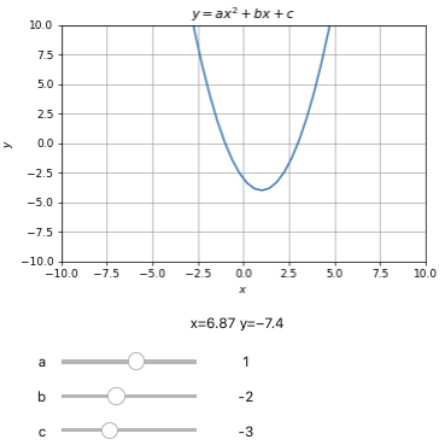
Definition 1 (Parabola)
The collection of points \((x,y)\) satisfying the following equation forms a parabola:
where \(a\), \(b\), and \(c\) are real numbers called the coefficients.
Exercise Given the variables x, a, b, and c store the \(x\)-coordinate and the coefficients \(a\), \(b\), and \(c\) respectively, assign y the corresponding \(y\)-coordinate of the parabola (2).
def get_y(x, a, b, c):
    # YOUR CODE HERE
    raise NotImplementedError()
    return y
To test your code:
# tests
def test_get_y(y, x, a, b, c):
    y_ = get_y(x, a, b, c)
    correct = math.isclose(y, y_)
    if not correct:
        print(f"With (x, a, b, c)={x,a,b,c}, y should be {y} not {y_}.")
    assert correct


test_get_y(0, 0, 0, 0, 0)
test_get_y(1, 0, 1, 2, 1)
test_get_y(2, 0, 2, 1, 2)
To run the graphical calculator:
# graphical calculator for parabola
fig, ax = plt.subplots()
xmin, xmax, ymin, ymax, resolution = -10, 10, -10, 10, 50
x = np.linspace(xmin, xmax, resolution)
ax.set_title(r'$y=ax^2+bx+c$')
ax.set_xlabel(r'$x$')
ax.set_ylabel(r'$y$')
ax.set_xlim([xmin, xmax])
ax.set_ylim([ymin, ymax])
ax.grid()
p, = ax.plot(x, get_y(x, 0, 0, 0))

@interact(a=(-10, 10, 1), b=(-10, 10, 1), c=(-10, 10, 1))
def plot_parabola(a, b, c):
    p.set_ydata(get_y(x, a, b, c))
Quadratic equation solver
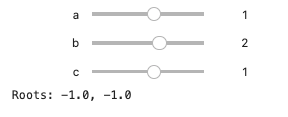
Proposition 2
Exercise Assign to root1 and root2 the values of the first and second roots above respectively.
def get_roots(a, b, c):
    # YOUR CODE HERE
    raise NotImplementedError()
    return root1, root2
To test your code:
# tests
def test_get_roots(roots, a, b, c):
    def mysort(c):
        return c.real, c.imag
    roots_ = get_roots(a, b, c)
    assert np.isclose(sorted(roots, key=mysort),
                      sorted(roots_, key=mysort)).all()

test_get_roots((-1.0, 0.0), 1, 1, 0)
test_get_roots((-1.0, -1.0), 1, 2, 1)
test_get_roots((-2.0, -1.0), 1, 3, 2)
test_get_roots([(-0.5-0.5j), (-0.5+0.5j)], 2, 2, 1)
To run the calculator:
# quadratic equations solver
@interact(a=(-10,10,1),b=(-10,10,1),c=(-10,10,1))
def quadratic_equation_solver(a=1,b=2,c=1):
    print('Roots: {}, {}'.format(*get_roots(a,b,c)))
Number conversion
Byte-to-Decimal calculator
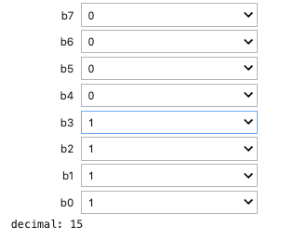
Denote a binary number stored in a byte (\(8\) bits) as
where \(\circ\) concatenates \(b_i\)’s together into a binary string.
The binary string can be converted to a decimal number by the formula
E.g., the binary string '11111111' is the largest integer represented by a byte:
Exercise Assign to decimal the integer value represented by the binary sequence b7,b6,b5,b4,b3,b2,b1,b0 of characters '0' or '1'.
def byte_to_decimal(b7, b6, b5, b4, b3, b2, b1, b0):
    """
    Parameters:
    -----------
    b7, ..., b0 are single characters either '0' or '1'.
    """
    # YOUR CODE HERE
    raise NotImplementedError()
    return decimal
To test your code:
# tests
def test_byte_to_decimal(decimal, b7, b6, b5, b4, b3, b2, b1, b0):
    decimal_ = byte_to_decimal(b7, b6, b5, b4, b3, b2, b1, b0)
    assert decimal == decimal_ and isinstance(decimal_, int)


test_byte_to_decimal(38, '0', '0', '1', '0', '0', '1', '1', '0')
test_byte_to_decimal(20, '0', '0', '0', '1', '0', '1', '0', '0')
test_byte_to_decimal(22, '0', '0', '0', '1', '0', '1', '1', '0')
To run the calculator:
# byte-to-decimal calculator
bit = ['0', '1']


@interact(b7=bit, b6=bit, b5=bit, b4=bit, b3=bit, b2=bit, b1=bit, b0=bit)
def convert_byte_to_decimal(b7, b6, b5, b4, b3, b2, b1, b0):
    print('decimal:', byte_to_decimal(b7, b6, b5, b4, b3, b2, b1, b0))
Decimal-to-Byte calculator
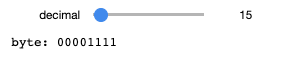
Exercise Assign to byte a string of 8 bits that represents the value of decimal, a non-negative decimal integer from \(0\) to \(2^8-1=255\).
Hint: Use // and %.
def decimal_to_byte(decimal):
    # YOUR CODE HERE
    raise NotImplementedError()
    return byte
To test your code:
# tests
def test_decimal_to_byte(byte,decimal):
    byte_ = decimal_to_byte(decimal)
    assert byte == byte_ and isinstance(byte, str) and len(byte) == 8


test_decimal_to_byte('01100111', 103)
test_decimal_to_byte('00000011', 3)
test_decimal_to_byte('00011100', 28)
To run the calculator:
# decimal-to-byte calculator
@interact(decimal=(0,255,1))
def convert_decimal_to_byte(decimal=0):
    print('byte:', decimal_to_byte(decimal))
Symbolic calculator (optional)
Can we do complicated arithmetics with Python. What about Calculus?
Solution: https://gamma.sympy.org/input/?i=integrate(tan(x))
Tip
Take a look at the different panels to learn about the solution:
Steps,Plot, andDerivative.Try different random examples.
How does SymPy Gamma work?
SymPy Gamma is a web application running SymPy, which is a python library for symbolic computation.
How to use SymPy?
To import the library:
import sympy as sp
We need to define a symbolic variable and assign it to a python variable.
x = sp.symbols('x')
x
The SymPy expression for \(\tan(x)\) is:
f = sp.tan(x)
f
To compute the integration:
int_f = sp.integrate(f)
int_f
To compute the derivative:
diff_int_f = sp.diff(int_f)
diff_int_f
The answer can be simplified as expected:
diff_int_f.simplify()
To plot:
p = sp.plot(f, int_f, (x, -sp.pi/4, sp.pi/4))
Exercise
Try to compute the following in SymPy and in jupyter notebook:
\(\frac{d}{dx} x^x\)
\(\frac{d}{dx} \frac{1}{\sqrt{1 - x^2}}\).
Hint
Use sp.sqrt or **(sp.S(1)/2) for square root instead of **0.5. See SymPy gotchas.