import os
import pprint as pp

import matplotlib.pyplot as plt
import numpy as np
import tensorflow.compat.v2 as tf
import tensorflow_datasets as tfds
from IPython import display
from matplotlib import pyplot as plt

# produce vector inline graphics
from matplotlib_inline.backend_inline import set_matplotlib_formats

set_matplotlib_formats("svg")
os.environ["TF_CPP_MIN_LOG_LEVEL"] = "2"
%matplotlib widget
Loading Data
What is an example in a dataset?
A neural network learns from many examples collected together as a dataset. For instance, the MNIST (Modified National Institute of Standards and Technology) dataset consists of labeled handwritten digits.
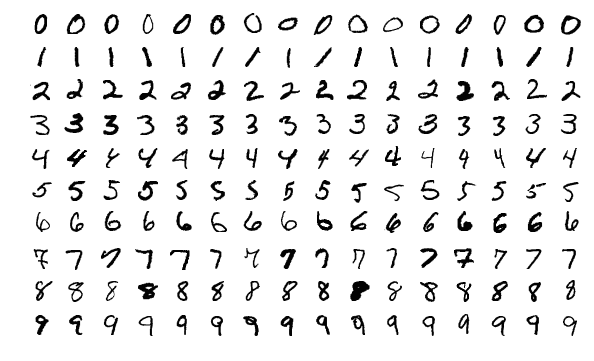
- an input feature vector such as an image of a handwritten digit and
- a label such as the digit type of the handwritten digit.
The goal is to classify the digit type of a handwritten digit.
How to load the MNIST dataset?
We first specify the folder to download the data.
Press Shift+Enter to evaluate the following cell:
import os

user_home = os.getenv("HOME")  # get user home directory
data_dir = os.path.join(user_home, "data")  # create download folder path

data_dir  # show the path
The MNIST dataset can be obtained in many ways due to its popularity in image recognition.
One way is to use the package tensorflow_datasets.
import tensorflow_datasets as tfds  # give a shorter name tfds for convenience

ds, ds_info = tfds.load(
    "mnist",
    data_dir=data_dir,  # download location
    as_supervised=True,  # separate input features and label
    with_info=True,  # return information of the dataset
)

ds- The function
tfds.loaddownloads the data todata_dirand prepare it for loading using variableds. - The data are loaded as
Tensors, which can be operated faster by GPU or TPU instead of CPU.
The dataset is split into
- a training set
ds["train"]and - a test set
ds["test"].
tfds.load? shows more information about the function. E.g., we can control the split ratio using the argument split.
Why split the data?
The test set is used to evaluate the performance of a neural network trained using the training set (separate from the test set).
The purpose of separating the test set from the training set is to avoid overly-optimistic performance estimate. Why?
Suppose the final exam questions (test set) are the same as the previous homework questions (training set).
- Students may get a high exam score simply by studying the model answers to the homework instead of understanding entire subject.
- The exam score is therefore an overly-optimistic estimate of the students’ understanding of the subject.
How large are the training set and test set?
Both the training and test sets are loaded as Dataset objects.
- The loading is lazy, i.e., the data is not yet in memory, we cannot count the number of instances directly.
- Instead, we obtain such information from
ds_info.
### BEGIN SOLUTION
train_size = ds_info.splits["train"].num_examples
test_size = ds_info.splits["test"].num_examples
### END SOLUTION
train_size, test_size
# tests
assert 0 < train_size < 100000
assert 0 < test_size < 50000
# hidden tests will be run to check your answers precisely after submission
### BEGIN HIDDEN TESTS
assert train_size == 60000
assert test_size == 10000
### END HIDDEN TESTSNote that the training set is often much larger than the test set especially for deep learning because
- training a neural network requires many examples but
- estimating its performance does not.
Data Visualization
The following retrieves an example from the training set.
for image, label in ds["train"].take(1):
    print(
        f"""image dtype: {type(image)} shape: {image.shape} element dtype: {image.dtype}
label dtype: {label.dtype}"""
    )
The for loop above takes one example from ds["train"] using the method take and print its data types.
- The handwritten digit is represented by a 28x28x1
EagerTensor, which is essentially a 2D array of bytes (8-bit unsigned integersuint8). - The digit type is an integer.
The following function plots the image using the imshow function from matplotlib.pyplot.
import matplotlib.pyplot as plt

plt.figure(num=1)
for image, label in ds["train"].take(1):  # take 1 example from training set
    plt.imshow(image)
    plt.title(label.numpy())  # show digit type as plot title
plt.show()- The method
numpy()is needed to convert the label to the correct integer type formatplotlib.
The following function plots the image properly in grayscale labeled by pixel values:
def plot_mnist_image(example, ax=None, pixel_format=None):
    (image, label) = example
    if ax == None:
        ax = plt.gca()
    ax.imshow(image, cmap="gray_r")  # show image
    ax.title.set_text(label.numpy())  # show digit type as plot title
    # Major ticks
    ax.set_xticks(np.arange(0, 28, 3))
    ax.set_yticks(np.arange(0, 28, 3))
    # Minor ticks
    ax.set_xticks(np.arange(-0.5, 28, 1), minor=True)
    ax.set_yticks(np.arange(-0.5, 28, 1), minor=True)
    if pixel_format is not None:
        for i in range(28):
            for j in range(28):
                ax.text(
                    j,
                    i,
                    pixel_format.format(image[i, j, 0].numpy()),  # show pixel value
                    va="center",
                    ha="center",
                    color="white",
                    fontweight="bold",
                    fontsize="small",
                )
        ax.grid(color="lightblue", linestyle="-", linewidth=1, which="minor")
        ax.set_xlabel("2nd dimension")
        ax.set_ylabel("1st dimension")
        ax.title.set_text("Image with label " + ax.title.get_text())


plt.figure(num=2)
for example in ds["train"].take(1):
    plot_mnist_image(example, pixel_format="{}")
plt.show()- We set the parameter
cmaptogray_rso the color is darker if the pixel value is larger.
if input("Execute? [Y/n]").lower != "n":

    def plot_mnist_image_matrix(ds, nrows=5, ncols=10, **args):
        fig, axes = plt.subplots(nrows=nrows, ncols=ncols, **args)

        ### BEGIN SOLUTION
        for ax, example in zip(axes.flat, ds["train"].take(nrows * ncols)):
            plot_mnist_image(example, ax)
            ax.axes.xaxis.set_visible(False)
            ax.axes.yaxis.set_visible(False)
        ### END SOLUTION

        fig.tight_layout()  # adjust spacing between subplots automatically
        return fig, axes

    fig, axes = plot_mnist_image_matrix(ds, nrows=5, num=3, figsize=(9, 6))
    # plt.savefig('mnist_examples.svg')
    plt.show()
Data Preprocessing
We will use the tensorflow library to process the data and train the neural network. (Another popular library is PyTorch.)
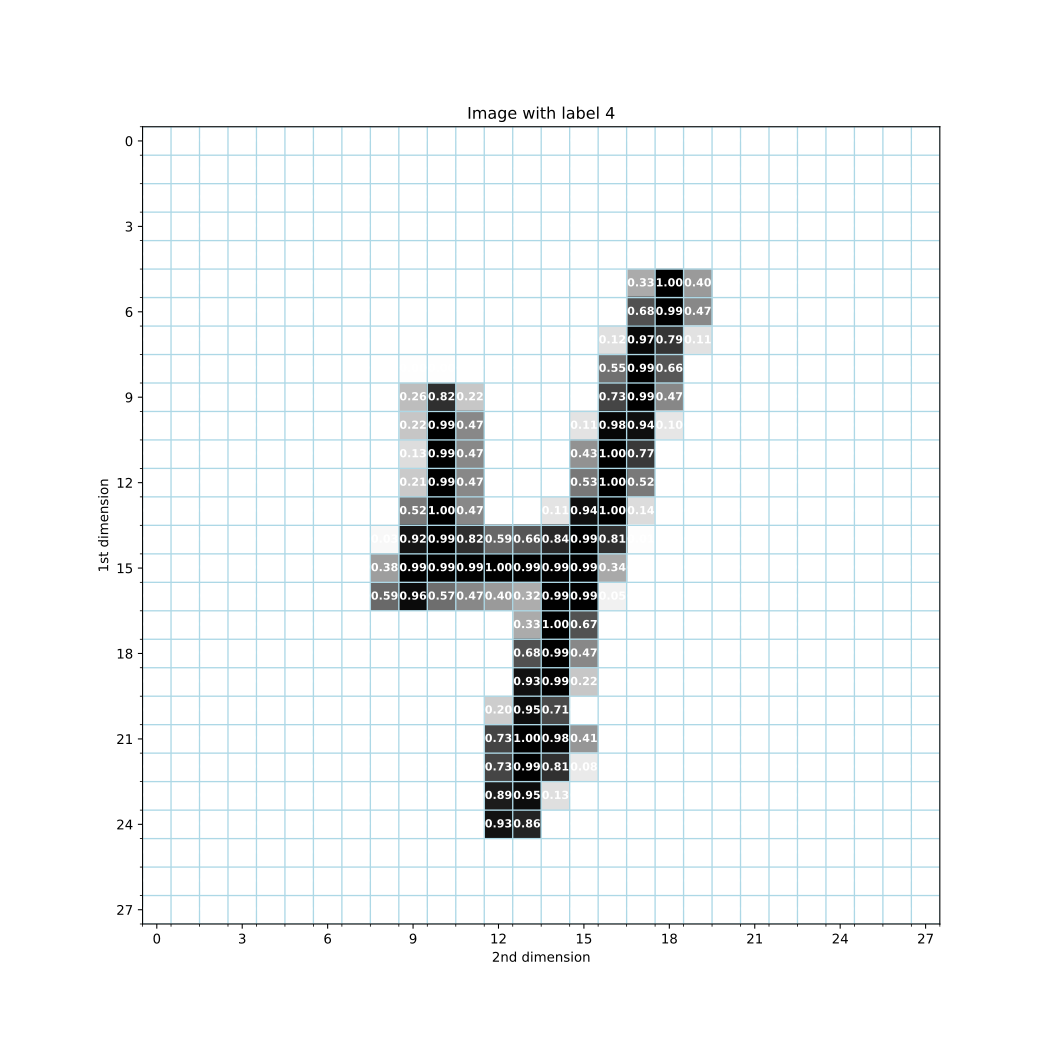
import tensorflow.compat.v2 as tf # explicitly use tensorflow version 2Each pixel is stored as an integer from (28 possible values). However, for computations by the neural network, we need to convert it to a floating point number. We will also normalize each pixel value to be within the unit interval :
def normalize_mnist(ds):
    """
    Returns:
    MNIST Dataset with image pixel values normalized to float32 in [0,1].
    """
    ds_n = dict.fromkeys(ds.keys())  # initialize the normalized dataset
    for part in ds.keys():
        # normalize pixel values to [0,1]
        ### BEGIN SOLUTION
        ds_n[part] = ds[part].map(
            lambda image, label: (tf.cast(image, tf.float32) / 255, label),
            num_parallel_calls=tf.data.experimental.AUTOTUNE,
        )
        # - `tf.cast(image, tf.float32) / 255` converts each element of `image`
        #    to a float and then normalize it to within the unit interval [0,1];
        # - `map` applies the conversion to each example in the dataset.
        ### END SOLUTION
    return ds_n


ds_n = normalize_mnist(ds)
ds_n
# Plot the normalized digit
if input("Execute? [Y/n]").lower != "n":
plt.figure(figsize=(11, 11), dpi=80)
for example in ds_n["train"].take(1):
plot_mnist_image(example, pixel_format="{:.2f}") # show pixel value to 2 d.p.s
# plt.savefig('mnist_example_normalized.svg')
plt.show()# tests
### BEGIN HIDDEN TESTS
image = ds["test"].__iter__().next()[0]
assert tf.math.reduce_all(
tf.math.equal(ds_n["test"].__iter__().next()[0], tf.cast(image, tf.float32) / 255.0)
)
### END HIDDEN TESTSTo avoid overfitting, the training of a neural network uses stochastic gradient descent which
- divides the training into many steps where
- each step uses a randomly selected minibatch of samples
- to improve the neural network bit-by-bit.
def batch_mnist(ds_n):
    ds_b = dict.fromkeys(ds_n.keys())  # initialize the batched dataset
    for part in ds_n.keys():
        ds_b[part] = (
            ds_n[part]
            .batch(128)  # Use a minibatch of examples for each training step
            .shuffle(
                ds_info.splits[part].num_examples, reshuffle_each_iteration=True
            )  # shuffle data for each epoch
            .cache()  # cache current elements
            .prefetch(tf.data.experimental.AUTOTUNE)
        )  # preload subsequent elements
    return ds_b


ds_b = batch_mnist(ds_n)
ds_b
The above code
- specifies the batch size (128) and
- enables caching and prefetching to reduce the latency in loading examples repeatedly for training and testing.
Solution to Exercise 4
Since the total number of examples may not be divisible by the batch size, the size of the last batch may be different from those of other batches.
Release Memory
You cannot run a notebook if you have insufficient memory. It is important to shut down a notebook to release the memory:
Kernel->Shut Down Kernel.
Josef Steppan, CC BY-SA 4.0 https://
creativecommons .org /licenses /by -sa /4 .0, via Wikimedia Commons