import logging

import matplotlib.pyplot as plt
import numpy as np
import pandas as pd
import weka.core.jvm as jvm
from IPython import display
from weka.classifiers import Classifier, Evaluation, FilteredClassifier
from weka.core.classes import Random
from weka.core.converters import Loader
from weka.filters import Filter

%matplotlib widget
In this notebook, you will use Weka to compare different classifiers trained using different algorithms or hyper-parameters.
Noise and Training Curves
In this notebook, you will complete the tutorial exercises in [Witten11] Ex 17.2.6 to 17.2.11 using the dataset glass.arff described at the beginning of [Witten11] 17.2.
The video on the left below demonstrates how to use the Explorer interface to train 3-Nearest-Neighbor (3NN) classifier with 50% of the training data corrupted by noise. Weka provides a convenient interface, called the Experimenter, to compare the performances of different classification algorithms on different datasets. This is demonstrated by the video on the right.
A more flexible way is to use the python-weka-wrapper. Choose the weka kernel and start the java virtual machine and load the glass.arff dataset:
jvm.start(logging_level=logging.ERROR)
loader = Loader(classname="weka.core.converters.ArffLoader")
data = loader.load_url(
    "https://raw.githubusercontent.com/Waikato/weka-3.8/master/wekadocs/data/"
    + "glass.arff"
)
data.class_is_last()
We can then create a filtered classifier with the following tools:
from weka.classifiers import Classifier, Evaluation, FilteredClassifier
from weka.core.classes import Random
from weka.filters import Filter
add_noise = Filter(classname="weka.filters.unsupervised.attribute.AddNoise")
IBk = Classifier(classname="weka.classifiers.lazy.IBk")
fc = FilteredClassifier()
fc.filter = add_noise
fc.classifier = IBkTo compute the 10-fold cross-validated accuracy of 3-NN classification with 50% noise:
add_noise.options = ["-P", str(50), "-S", str(0)]  # percentage noise  # random seed
IBk.options = ["-K", str(3)]  # number of nearest neighbors
evl = Evaluation(data)
evl.crossvalidate_model(fc, data, 10, Random(1))
evl.percent_correctnoise_df = pd.DataFrame(columns=["k=1", "k=3", "k=5"], dtype=float)
noise_df.insert(0, "Percentage Noise", np.arange(0, 101, 10))
# YOUR CODE HERE
raise NotImplementedError()
display.display(noise_df.round(2))
plt.figure(figsize=(8, 5))
for k in ["1", "3", "5"]:
plt.plot(
noise_df["Percentage Noise"], noise_df["k=" + k], label="k=" + k, marker="o"
)
plt.legend()
plt.xlabel("Percentage Noise")
plt.ylabel("Accuracies")
plt.title(r"Training IB$k$ on noisy data for different $k$")
plt.show()YOUR ANSWER HERE
YOUR ANSWER HERE
train_df = pd.DataFrame(columns=["IBk", "J48"], dtype=float)
train_df.insert(0, "Percentage of Training Set", np.arange(10, 101, 10))

# YOUR CODE HERE
raise NotImplementedError()

display.display(train_df.round(2))

plt.figure(figsize=(8, 5))
for clf in ["IBk", "J48"]:
    plt.plot(
        train_df["Percentage of Training Set"], train_df[clf], label=clf, marker="o"
    )
plt.legend()
plt.xlabel("Percentage of Training Set")
plt.ylabel("Accuracies")
plt.title(r"Training IB$k$ and J48 with different amount of data")
plt.show()YOUR ANSWER HERE
YOUR ANSWER HERE
YOUR ANSWER HERE
Classification Boundaries
Complete the tutorial exercises in [Witten11] Ex 17.3.1 to 17.3.6 using the boundary visualizer for different classifiers on iris.2D.arff (NOT iris.arff) dataset.
For OneR, note that the boundary is decided based on two conditions in Appendix A of Holte93:
- (3a) Minimum size of the optimal class should be at least
minBucketSize, and - (3b) the optimal class of the smallest value should be larger than the boundary to be of a different class value.
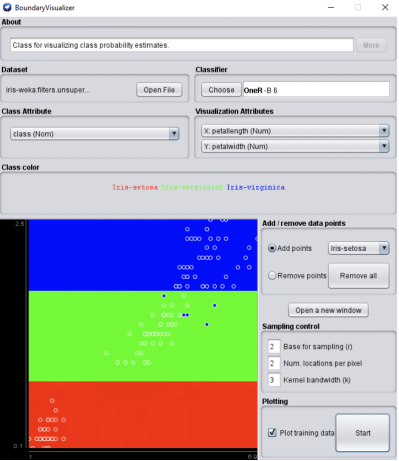
Figure 1:OneR decision boundary
YOUR ANSWER HERE
YOUR ANSWER HERE
YOUR ANSWER HERE
YOUR ANSWER HERE
YOUR ANSWER HERE
YOUR ANSWER HERE